Your business,
always
available. Even
when your
team isn’t.
Your customers already message you. Qatch Omni AI trains on your own business data and handles every conversation automatically, across web, messaging, and phone, in multiple languages. Faster replies, no missed messages, no dropped conversations. Your customers feel the difference. They just never see what is making it happen.
 Trained on your own business data Works across web, messaging, and phone Multilingual from day one Live agent handoff when it matters Self-serve onboarding portal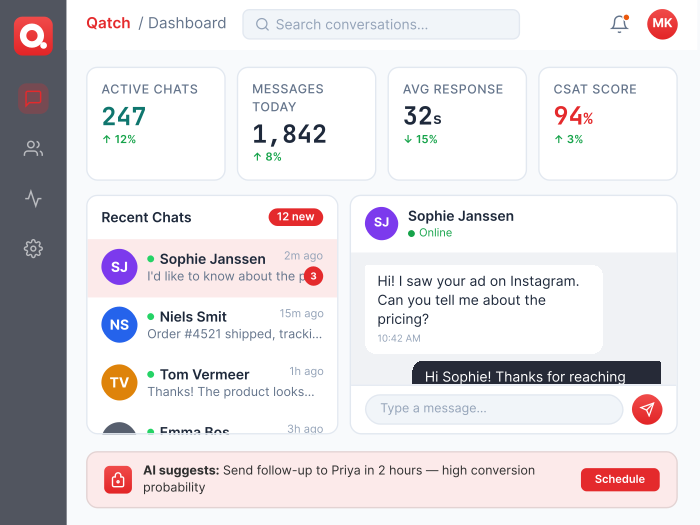
The problem
Your customers expect an instant response.
Your team cannot always deliver one.
If any of these sound familiar, Qatch Omni AI was built for you.

Conversations fall through the cracks
Messages come in at all hours on multiple channels. Someone replies, someone misses it, someone replies twice. There is no system, no record, and no way to know what has actually been handled until a customer complains.

Your team spends most of its time on repetitive queries
Booking confirmations, fare estimates, cancellation policies, lost and found, payment questions. The same questions answered manually, over and over, by people who could be doing something more valuable.

You have no visibility into how well your business communicates
No data on response times, resolution rates, or which queries your team handles well versus poorly. You cannot improve what you cannot measure.
Train it once on your business,
then let it run.
Qatch Omni AI learns everything about your business through a
structured self-serve onboarding process, then handles customer
conversations automatically from day one.

1
Complete your
onboarding profile
Through a self-serve portal, you provide everything the AI needs to represent your business accurately: your services, pricing, booking rules, fleet details, policies, FAQs, and more. The process is tiered so you can go live on the essentials and add depth over time.

2
Connect your channels
Link your website widget, business messaging number, and phone line. Your customers keep contacting you the same way they always have. The AI answers on your behalf from the moment it goes live.

3
Set your escalation rules
Define exactly when the AI should hand a conversation to a live agent: specific keywords, customer sentiment, failed actions, or an explicit request to speak to a person. Your team gets only the conversations that genuinely need them.

4
Go live and keep improving
Your AI profile is a living document. Update it quarterly or whenever your pricing, hours, or services change. The more current your data, the better your AI performs.
One platform that
handles the volume,
routes the
exceptions, and gives
you full visibility.
Qatch Omni AI combines an AI layer that works automatically with a shared team inbox that
catches everything the AI escalates, so nothing ever falls through the cracks.

AI trained on your business
Every response the AI gives is based on your own data: your prices, your policies, your fleet, your booking rules, your FAQs. It does not give generic answers. It gives your answers, in your tone, consistently, at any hour, across every channel you operate.

Multi-channel coverage
Your customers can reach you through your website widget, your business messaging number, or your phone line, and the AI handles all three from a single platform. No separate tools, no separate inboxes, no conversations lost between channels.

Multilingual from day one
Qatch Omni AI communicates in the languages your customers speak. Configure your primary language and additional supported languages during onboarding. Dutch, English, and other languages relevant to your market are all supported, so no customer is left without a proper response because of a language barrier.

Shared team inbox
When the AI escalates a conversation, it lands in a shared inbox where your team can pick it up immediately. Conversations are organised by department, labelled for priority, and assigned to the right agent. Your team sees only what needs a human, not the full volume of everything coming in.

Departments, labels, and roles
Structure your team the way your business works. Route escalated conversations to Sales, Support, Dispatch, or any department you define. Label conversations as Urgent, VIP, Complaint, or any custom tag that fits your workflow. Set roles and permissions so every team member sees exactly what is relevant to them.

Campaigns
Send targeted messages to your contact list at scale. Custom text, quick reply buttons, or media. Schedule in advance, run live, pause and resume as needed. Track delivery and response rates per campaign so you know what is working.

Analytics and performance
Track response times, resolution rates, message volumes, escalation rates, and campaign performance across any date range. Know exactly where your AI is performing well and where your human team is adding the most value. The data is there to help you improve, not just to report.

Campaign tracking
Tag outbound campaigns with tracking parameters to measure how many conversations, bookings, or conversions each campaign drives. Connect your messaging activity to your broader marketing data so every campaign can be properly evaluated.

Mobile app and API
Access Qatch Omni AI on desktop or mobile, iOS and Android. For technical teams, full API key management for third-party integrations. Connect Omni to your CRM, booking system, ERP, or any other tool your business runs on.
What the AI handles
The conversations your team should
not have to answer manually.
Qatch Omni AI is trained to handle the full range of customer interactions a transport or
service business receives every day.
 Bookings and reservations Lost and found Policies and FAQs Tracking and live updates Pricing and fare queries Complaints and escalations Out-of-hours responses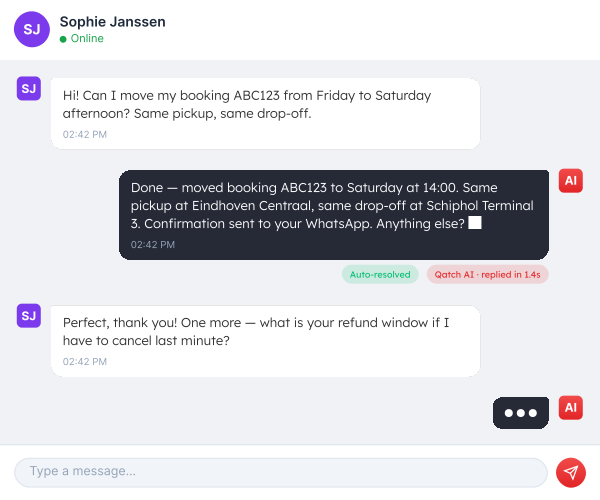
Your AI is only as good
as what you teach it.
When you sign up for Qatch Omni AI, you complete a structured self-serve onboarding
profile that covers everything the AI needs to represent your business accurately. It is
organised into tiers so you can go live quickly and add depth over time.

Get live fast
The essentials your AI needs to function: your company details, contact information, service area, vehicle types, pricing structure, booking rules, payment methods, and your existing FAQs. Most businesses can complete this in an afternoon.

Full service quality
Everything needed for a complete, high-quality customer experience: surcharges, cancellation policies, accessibility details, special services, complaint handling procedures, driver standards, and channel-specific setup for web, messaging, and phone.
Accuracy and personalisation
The details that make your AI feel genuinely on-brand: your tone of voice, banned phrases, brand persona, loyalty programmes, seasonal FAQs, and sample real conversations for fine-tuning. The more of this you provide, the more your AI sounds like your business rather than a generic bot.

Keeping it current
Your profile is versioned, so every update goes through a review before the AI is updated. Quarterly refresh prompts remind you to confirm that pricing, hours, and promotions are still accurate so your AI never gives a customer outdated information.
When your business is on top of
every conversation, your customers notice.
Your customers already message you. Qatch Omni AI makes sure every message gets answered fast, no one gets forgotten, and your
team stays on top of every conversation, all without your customers ever knowing what is running behind the scenes.
Already using Qatch products?
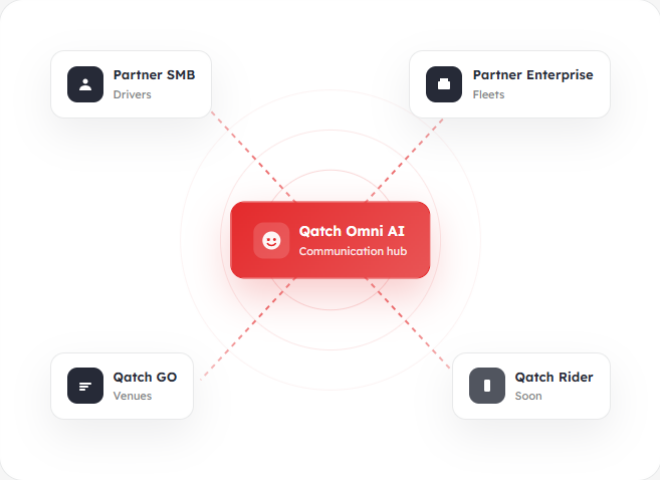
Omni AI connects directly to the
rest of Qatch.
Already using Qatch Partner or Qatch GO? Omni AI connects directly. One ecosystem, one set of customer data, one consistent experience.

See Qatch Partner SMB
For solo drivers and small operations


See Qatch Partner Enterprise
For contract transport and corporate fleets

See Qatch GO Smart Queueing
For airports, venues, and transport hubs
Frequently asked questions
Your business should never miss
a customer conversation.
Qatch Omni AI handles the volume automatically so your team can focus on
the conversations that actually need them. Set it up yourself, go live fast, and
keep improving over time.
 Use your existing number
Multilingual
AI trained on your data
Web, messaging and phone
Live agent handoff